



Holiday Selfies for Social Media
Turn everyday selfies into festive hits ready for Instagram and TikTok. Add Santa cloak and snow for instant likes during Christmas season.
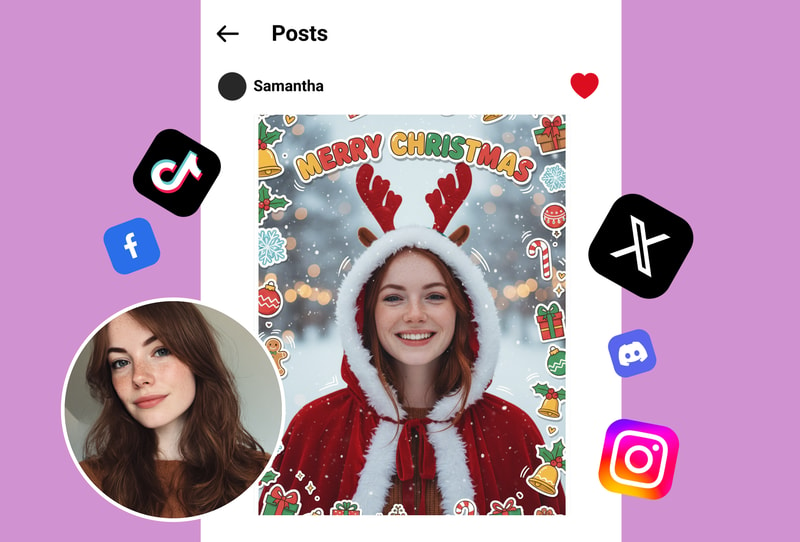

Family Christmas Cards and Gifts
Customize family photos with holiday stickers and winter doodles. Ideal for cards, ornaments, or personalized gifts that capture the season's joy.
Party Invites and Profile Updates
Dress up profile pics or invites with Santa looks and snow effects. Stand out at virtual parties or update feeds with quick festive transformations.

Why People Choose Christmas Photo Filter
Instant Santa Cloak Application
Upload a photo and get the Santa cloak added right away. Delivers quick, detailed holiday looks with no editing needed.
Snow Effects and 2D Doodles
Apply cute winter stickers and doodles for a whimsical touch. Results feature precise, vibrant festive details every time.
High-Quality Shareable Outputs
Generate crisp images ready for social sharing. Clean, watermark-free results preserve photo clarity and holiday charm.
How to Use
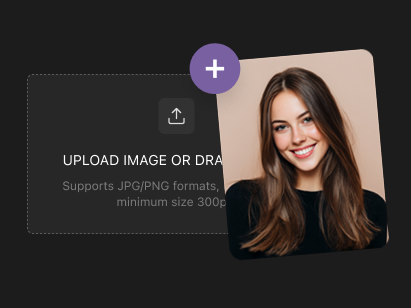
Step 1: Upload Your Photo
Select or drag your selfie or image into the uploader. Use clear, well-lit photos in JPG, PNG, or WEBP for best holiday transformations.

Step 2: Apply Festive Effects Automatically
The tool processes your upload right away, adding Santa cloak, stickers, 2D doodles, and snow. No extra settings needed—just watch the magic happen.
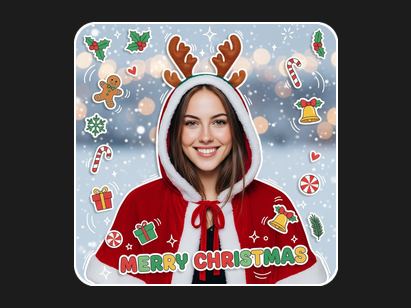
Step 3: Download Your Winter Masterpiece
Get your transformed image in seconds, high-quality and ready to save or share. Clean output ideal for social media or prints.
What People Say
I always struggle to make my selfies festive without spending hours in editing apps—colors wash out, and effects look fake. Then I tried the Christmas photo filter, uploading a simple indoor shot, and it added a perfect Santa cloak with soft snow falling around me, plus those adorable 2D doodles that made it feel like a holiday card. The quality stayed sharp, no blurry mess, and it took seconds. Now my Instagram stories get way more engagement during the holidays, and friends keep asking how I did it. It's become my go-to for quick cheer without the difficulty of pro software or skills. Totally transformed my content game this season.
Emma L., 29, Social Media Influencer
As a designer, I need tools that deliver pro-level results fast, but holiday edits often require layers of manual work in Photoshop, eating up my time. The Christmas photo filter changed that—uploaded a family portrait, and it instantly wrapped everyone in Santa cloaks with realistic snow and playful stickers. The output was detailed and balanced, keeping natural lighting while adding magic. Downloaded clean files for client cards, and they loved the winter vibe. Saved me days of tweaking, and now I recommend it to my team for quick seasonal projects. Reliable, effective, and spot-on for festive needs.
Michael R., 35, Graphic Designer
Holiday photos from my phone always looked boring, especially group shots at parties—no sparkle, just dull backgrounds. I found the Christmas photo filter and uploaded pics from last night's gathering; it added Santa outfits, swirling snow, and cute doodles that made everyone laugh. Processing was super fast, results high-res and fun, ideal for sharing on Snapchat without filters washing faces out. My friends started using it too, and this group chat exploded with holiday edits. No more plain pics—now every event feels magical and ready to post. Best discovery for broke students wanting pro looks.
Sophia K., 24, College Student
Corporate holiday posts need polish but my team's photos lacked that festive edge—tried stock images, but they felt impersonal. Switched to Christmas photo filter: uploaded staff headshots, got Santa cloaks, snow overlays, and doodle accents in moments. Effects blended smoothly with originals, maintaining professional quality for emails and LinkedIn. Boosted engagement on this campaigns, and clients noticed the charm. Easy for non-designers on the team, quick turnaround, and outputs that print beautifully for cards. Elevated this branding without extra costs or time sinks—game on for next year's holidays.
David P., 42, Marketing Manager
Taking kid photos during Christmas is chaotic—blurry messes from excitement, no way to add holiday flair simply at home. The Christmas photo filter fixed it: uploaded a candid of my toddler by the tree, and it draped a mini Santa cloak, sprinkled snow, and doodled festive bits around. Results were adorable, crystal clear, and captured real smiles without distortion. Printed them for grandparents, shared online, got tons of compliments. No learning curve, just upload and done—saved sanity during busy prep. Now this album looks straight out of a storybook, full of joy.
Lisa M., 31, Stay-at-Home Parent
I always struggle to make my selfies festive without spending hours in editing apps—colors wash out, and effects look fake. Then I tried the Christmas photo filter, uploading a simple indoor shot, and it added a perfect Santa cloak with soft snow falling around me, plus those adorable 2D doodles that made it feel like a holiday card. The quality stayed sharp, no blurry mess, and it took seconds. Now my Instagram stories get way more engagement during the holidays, and friends keep asking how I did it. It's become my go-to for quick cheer without the difficulty of pro software or skills. Totally transformed my content game this season.
Emma L., 29, Social Media Influencer
As a designer, I need tools that deliver pro-level results fast, but holiday edits often require layers of manual work in Photoshop, eating up my time. The Christmas photo filter changed that—uploaded a family portrait, and it instantly wrapped everyone in Santa cloaks with realistic snow and playful stickers. The output was detailed and balanced, keeping natural lighting while adding magic. Downloaded clean files for client cards, and they loved the winter vibe. Saved me days of tweaking, and now I recommend it to my team for quick seasonal projects. Reliable, effective, and spot-on for festive needs.
Michael R., 35, Graphic Designer
Holiday photos from my phone always looked boring, especially group shots at parties—no sparkle, just dull backgrounds. I found the Christmas photo filter and uploaded pics from last night's gathering; it added Santa outfits, swirling snow, and cute doodles that made everyone laugh. Processing was super fast, results high-res and fun, ideal for sharing on Snapchat without filters washing faces out. My friends started using it too, and this group chat exploded with holiday edits. No more plain pics—now every event feels magical and ready to post. Best discovery for broke students wanting pro looks.
Sophia K., 24, College Student
Corporate holiday posts need polish but my team's photos lacked that festive edge—tried stock images, but they felt impersonal. Switched to Christmas photo filter: uploaded staff headshots, got Santa cloaks, snow overlays, and doodle accents in moments. Effects blended smoothly with originals, maintaining professional quality for emails and LinkedIn. Boosted engagement on this campaigns, and clients noticed the charm. Easy for non-designers on the team, quick turnaround, and outputs that print beautifully for cards. Elevated this branding without extra costs or time sinks—game on for next year's holidays.
David P., 42, Marketing Manager
Taking kid photos during Christmas is chaotic—blurry messes from excitement, no way to add holiday flair simply at home. The Christmas photo filter fixed it: uploaded a candid of my toddler by the tree, and it draped a mini Santa cloak, sprinkled snow, and doodled festive bits around. Results were adorable, crystal clear, and captured real smiles without distortion. Printed them for grandparents, shared online, got tons of compliments. No learning curve, just upload and done—saved sanity during busy prep. Now this album looks straight out of a storybook, full of joy.
Lisa M., 31, Stay-at-Home Parent
I always struggle to make my selfies festive without spending hours in editing apps—colors wash out, and effects look fake. Then I tried the Christmas photo filter, uploading a simple indoor shot, and it added a perfect Santa cloak with soft snow falling around me, plus those adorable 2D doodles that made it feel like a holiday card. The quality stayed sharp, no blurry mess, and it took seconds. Now my Instagram stories get way more engagement during the holidays, and friends keep asking how I did it. It's become my go-to for quick cheer without the difficulty of pro software or skills. Totally transformed my content game this season.
Emma L., 29, Social Media Influencer
As a designer, I need tools that deliver pro-level results fast, but holiday edits often require layers of manual work in Photoshop, eating up my time. The Christmas photo filter changed that—uploaded a family portrait, and it instantly wrapped everyone in Santa cloaks with realistic snow and playful stickers. The output was detailed and balanced, keeping natural lighting while adding magic. Downloaded clean files for client cards, and they loved the winter vibe. Saved me days of tweaking, and now I recommend it to my team for quick seasonal projects. Reliable, effective, and spot-on for festive needs.
Michael R., 35, Graphic Designer
Holiday photos from my phone always looked boring, especially group shots at parties—no sparkle, just dull backgrounds. I found the Christmas photo filter and uploaded pics from last night's gathering; it added Santa outfits, swirling snow, and cute doodles that made everyone laugh. Processing was super fast, results high-res and fun, ideal for sharing on Snapchat without filters washing faces out. My friends started using it too, and this group chat exploded with holiday edits. No more plain pics—now every event feels magical and ready to post. Best discovery for broke students wanting pro looks.
Sophia K., 24, College Student
Corporate holiday posts need polish but my team's photos lacked that festive edge—tried stock images, but they felt impersonal. Switched to Christmas photo filter: uploaded staff headshots, got Santa cloaks, snow overlays, and doodle accents in moments. Effects blended smoothly with originals, maintaining professional quality for emails and LinkedIn. Boosted engagement on this campaigns, and clients noticed the charm. Easy for non-designers on the team, quick turnaround, and outputs that print beautifully for cards. Elevated this branding without extra costs or time sinks—game on for next year's holidays.
David P., 42, Marketing Manager
Taking kid photos during Christmas is chaotic—blurry messes from excitement, no way to add holiday flair simply at home. The Christmas photo filter fixed it: uploaded a candid of my toddler by the tree, and it draped a mini Santa cloak, sprinkled snow, and doodled festive bits around. Results were adorable, crystal clear, and captured real smiles without distortion. Printed them for grandparents, shared online, got tons of compliments. No learning curve, just upload and done—saved sanity during busy prep. Now this album looks straight out of a storybook, full of joy.
Lisa M., 31, Stay-at-Home Parent